AI tools like ChatGPT, Copilot, and Perplexity are not only transforming how people search and interact online — they’re also quietly becoming new sources of traffic to your website.
To help you understand how these tools are impacting your business, we’re releasing a free Looker Studio report that lets you analyze traffic from AI tools using your own Google Analytics 4 (GA4) data.
Who Is This Report For?
This report is built especially for:
- E-commerce store owners and marketers who want to understand how AI-driven visits affect product engagement and revenue.
- Anyone curious about how AI tools influence web traffic, even when they’re not immediately visible as referrers.
No technical skills are required — if you have access to a GA4 property, you’re good to go.
What Does the Report Show?
The report pulls live data from your GA4 account and focuses specifically on AI-generated traffic. It tracks traffic from popular platforms like:
- chatgpt.com
- openai.com
- copilot.microsoft.com
- perplexity.ai
- claude.ai
- jasper.ai
- and others.
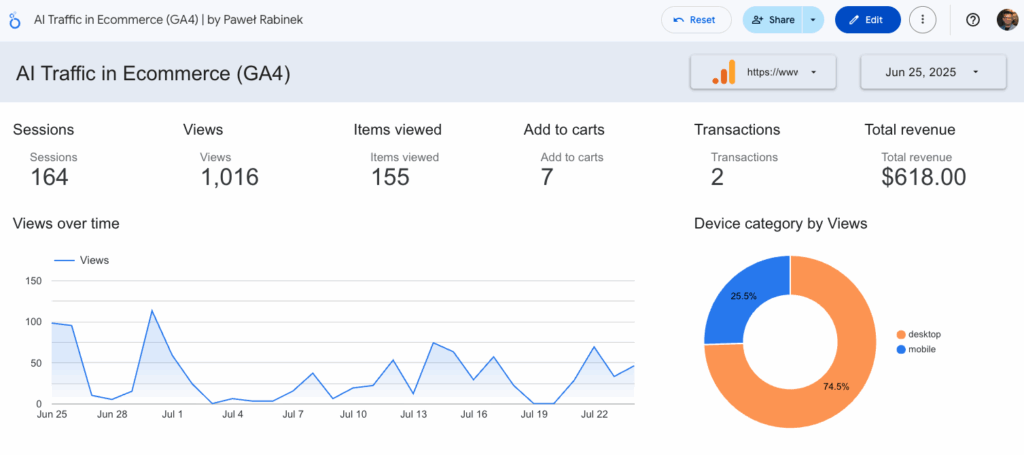
It shows key ecommerce performance metrics such as:
- Sessions – how often users from AI tools visit your store
- Product views – how engaged they are with your catalog
- Add-to-carts – how many AI-driven users show purchase intent
- Transactions and revenue – whether these visits actually convert
- Landing pages and items viewed – what content or products AI users are most drawn to
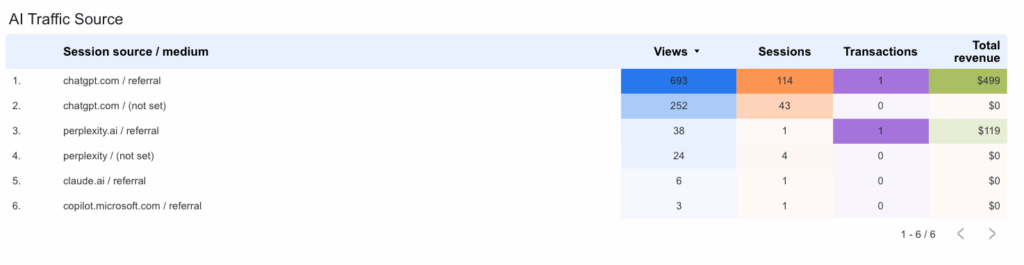
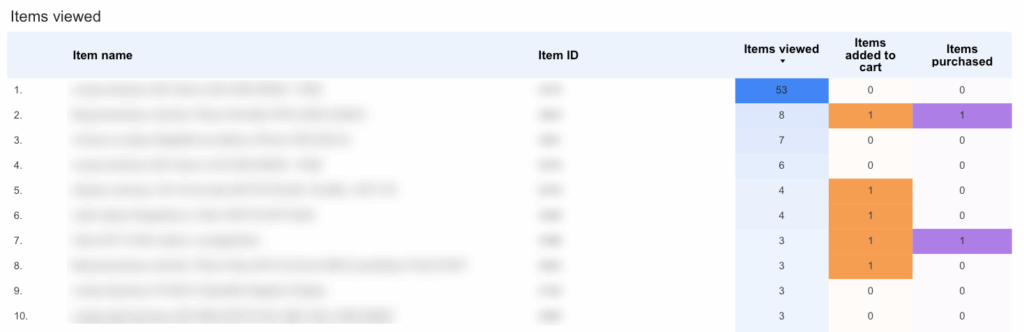
You’ll also get insights by device type (mobile vs desktop), and can break down performance by source, comparing how different AI platforms behave.
Why It Matters
AI tools often send traffic without traditional referral data — sometimes showing up as “direct/none” in GA4. This makes it harder to understand their true influence on your business.
With this report, you can:
- Identify which AI tools are sending traffic
- Understand how that traffic behaves
- Uncover new opportunities to optimize for AI-driven discovery
How to Use the Report
Using the report is simple and secure:
- Click the link below to open the public Looker Studio report
- When prompted, connect your own Google Analytics 4 (GA4) property
- The report will instantly display your data — and only data from GA4 properties you have access to
✅ Your data is completely private.
No one else will see your GA4 data — not the report author, and not other users. The report is just a template that pulls live data from your connected account.
🔧 Want to customize the layout or add more views?
To modify the report (change charts, metrics, filters, etc.), simply make a copy by clicking “File → Make a copy” in Looker Studio. Once copied, you’ll have full editing rights and can adapt it to your needs.
⚠️ A Few Limitations
- Not all AI tools pass referrer or UTM data — some traffic may still appear as “direct / none”.
- This report only captures traffic that GA4 can attribute to known AI sources.
- To improve accuracy, consider adding UTM tags when sharing your content via AI tools or chats.
- 💱 If your store uses a currency other than USD, the “Total revenue” field may display incorrectly. To fix this, make a copy of the report and adjust the currency format in the chart settings.
🚀 Start Tracking AI Traffic Today
AI is becoming a new kind of referrer — subtle, fast-growing, and often invisible in traditional analytics. With this free GA4 report, you can finally shine a light on what’s really happening.
👇👇👇
https://lookerstudio.google.com/reporting/60384546-e38a-476a-ac6f-8cc27463afe6
Troubleshooting: Empty Report?
If you open the report and see blank fields or empty charts — don’t worry.
Just make sure that in the top-right corner of the report, you’ve selected a GA4 property that you have access to. Without selecting a data source, the report can’t load your metrics.
Got questions about the report?
Feel free to message me directly on LinkedIn – happy to help!