Your products can appear for free across various Google services thanks to the “Free listings for products” program. It’s a fantastic way to boost your online store’s visibility and traffic without spending money on ads!
In this Article, You Will Learn:
- Where Do Your Products Appear for Free?
- What Are the Requirements for the “Free listings for products” Program?
- How to Activate “Free Listings for Products” on a Google Merchant Center CSS Account?
- What if I can’t find these settings?
- Warning: “CSS not selected for this destination”
- Frequently Asked Questions
Where Do Your Products Appear for Free?
Google Search – Your products can show up next to search results when customers use Google Search to look for product information, sellers, or brands.
Shopping tab – Free listings for products are displayed on the “Shopping” tab in Google, providing a visual experience for customers searching for items like yours. This tab, found at google.com/shopping, showcases free listings alongside paid ads from Google Ads.
Google Images – Your products can appear under the “Images” section in Google Search. This is perfect for customers browsing for visual inspiration.
YouTube – Your products may be displayed next to videos, aligning with the content customers are watching.
To learn more about the “Free Listings for Products” program, check out the Google Merchant Center help article: https://support.google.com/merchants/answer/13889434
What Are the Requirements for the “Free listings for products” Program?
To display your products for free on Google, you need to meet the following requirements:
- Follow Google’s Guidelines – Strictly adhere to the policies for displaying products for free on Google. Learn more here: Google Merchant Center Help.
- Provide Essential Policies – Make sure your store’s website includes clear return policies, terms of service, and a privacy policy.
- Show Accurate Pricing – Display final, tax-inclusive product prices on your website that match those in your Google Merchant Center account.
- Add Delivery Costs – Clearly specify delivery costs, including “doorstep” delivery, and ensure these are accurately reflected in your Google Merchant Center account.
Learn about the detailed requirements and best practices for the “Free Listings for Products” program on the Google Merchant Center help page: https://support.google.com/merchants/answer/12073010
Important Notes:
- The “Free listings for products” program does not guarantee that your products will appear on Google services. Visibility can vary, and it’s possible that your products might not show at all.
- To increase visibility, make sure your product data is accurate, with detailed titles and descriptions.
If you want to ensure your products are consistently visible on Google Search and other services, consider using Google Ads (paid option).
How to Activate “Free Listings for Products” on a Google Merchant Center CSS Account?
To publish free listings for products on a Sellie CSS Merchant Center account, you need a separate “standard” Merchant Center account that operates within the Google Shopping CSS service, with your store’s URL verified.
The Sellie CSS Merchant Center account and the standard Google Shopping CSS Merchant Center account differ in their settings, and only on the Google Shopping account can you activate and link the correct Merchant Center account for publishing free product listings.
Therefore, you will need two Merchant Center accounts:
- Sellie CSS Merchant Center Account – This is your CSS-type Merchant account where your products will be listed.
- Standard Google Shopping Merchant Center Account – This account is used only to verify your store’s URL and activate the “Free Listings for Products” program. You can, but don’t have to, add products to this account.
Steps to Activate “Free Listings for Products” on Sellie CSS Google Merchant Account:
- Go to the Google Merchant Center website.
2. Create a new standard Google Merchant Center account.
3. Claim and verify your online store’s URL. Check out this help article if you need support: https://support.google.com/merchants/answer/11586344

4. Go to Settings > Comparison Shopping Services.

5. Expand the “Comparison Shopping Services (CSSs) selection” section.

6. Find “Redseo Paweł Rabinek (sellie.pl)” and click the three dots to select “Make this the CSS for free listings in Europe.”

By following these steps, your products will appear for free across Google services, with product data coming from your Sellie CSS Merchant Center account.
What if I can’t find these settings?
If you can’t find the settings mentioned above, make sure you’re logged into your Google Merchant Center account that’s set up as Google Shopping (not a CSS type account). If you have this type of account, you’ll find the option there to select your preferred account for the “Free listings” program.
If you don’t currently have a Google Shopping (non-CSS) Merchant Center account, you’ll need to create one first and verify your online store’s domain. After successful verification, you’ll see the option to choose which account manages your “Free listings.”
Warning: “CSS not selected for this destination”
The Free Listings program can only be active on one Google Merchant Center account at a time. Therefore, if you have multiple Merchant Center accounts for the same online store, ensure that the Free Listings program is enabled only on a single account.
If this program is active on more than one account, you’ll see the warning “CSS not selected for this destination” indicating the need to adjust your account settings.
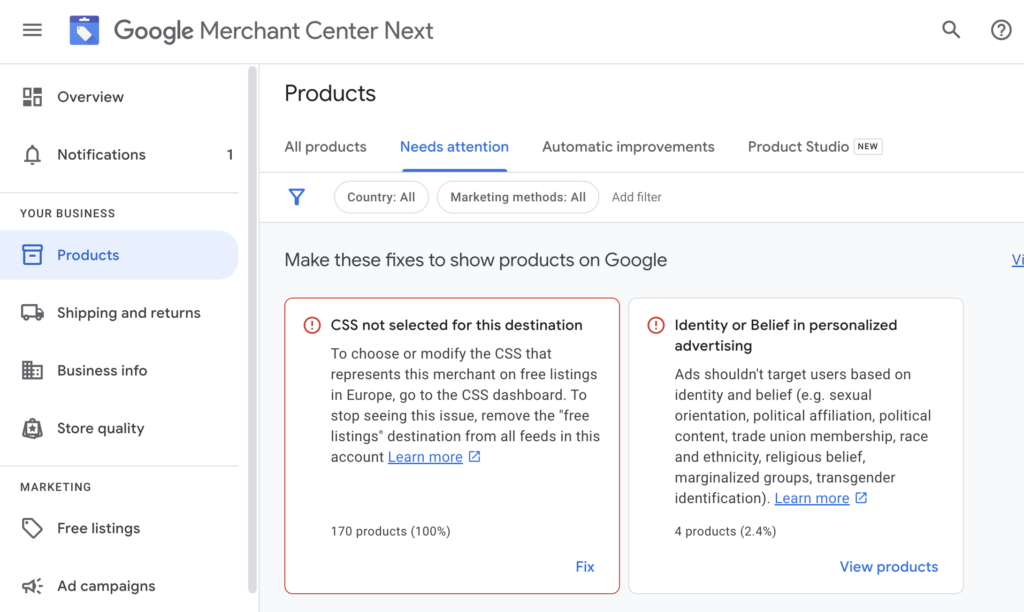
For detailed guidance on resolving this issue, please refer to our article: CSS not selected for this destination – How to fix it?
Frequently Asked Questions
Can I Have Two Google Merchant Center Accounts at the Same Time?
Yes, you can have both a standard Google Merchant Center account (Google Shopping) and a Sellie CSS Merchant Center account simultaneously. Only the standard Google Merchant account requires URL verification.
Can Free Listings for Products Pull Information from a Sellie CSS Account?
Yes, absolutely. Simply select your Sellie CSS account on the standard Google Merchant Center account (Google Shopping) to display free product listings, as outlined in this guide.
Can Free Listings for Products Be Active on Multiple Merchant Center Accounts at the Same Time?
No, only one Merchant Center account for your store can manage the Free Listings for Products program. You can’t activate it on every account – just one selected account.
Don’t have a Sellie CSS Merchant Center account yet?
Check out the current offer and get started now!